 GoSuda
Teaching Your Go Program to Speak Like Chrome

If you have ever traveled abroad and ordered coffee in a textbook-perfect phrase, you know the look the barista gives you. Your grammar is fine. Every word is in the dictionary. And yet, within half a second, everyone in the cafe knows you are from out of town.
Go's standard HTTP client has a bit of that problem. It is a great default: reliable, clean, and ready for serious work right out of the box. When your program reaches out to a server, though, it unmistakably looks like a Go program. Most of the time, nobody minds. Still, some websites, CDNs, and test setups pay close attention to who is knocking at the door, and they behave quite differently depending on what kind of client they think they are talking to.
That is why we built gosuda.org/chromenet. Instead of coaching Go's standard client to do a passable browser impression, chromenet lets a Go program talk to the web with the same network engine that Google Chrome uses, which is Chromium's own network code. Whether you are checking how your own test setups treat browser traffic or talking to a site behind a picky CDN, speaking through Chrome's engine removes a whole layer of guesswork.
You do not have to rewrite your application to use it. In your code, it works as a drop-in replacement for http.Transport. You keep using http.Client the way you always have, and chromenet handles the conversation underneath.
To try the latest release, install it with go get:
1go get gosuda.org/chromenet@v0.2.10157081033800
Then hand its transport to your client:
1client := http.Client{
2	Transport: chromenet.NewTransport(chromenet.Options{}),
3}
With this release, the full range of modern web traffic travels through Chrome's engine. It now covers ordinary web requests, WebSocket, and WebTransport. Earlier versions only did ordinary requests properly, while WebSocket and WebTransport were stand-ins. That meant your initial greeting at the front door sounded like Chrome, but if you switched to a different style of conversation, your cover could slip. This release replaces those stand-ins with the real thing.
Wait, if we are using Chromium's own network code, does that mean your quiet Go build turns into a sprawling C compiler headache? Happily, no. Your Go code stays plain Go, with no cgo and no C compiler needed.
Instead of welding browser code straight into your binary, chromenet runs the engine as a small separate program next to your Go program. Think of it like hiring a fluent local interpreter who walks beside you rather than trying to rebuild your own vocal cords. Because the engine runs in that separate program, a crash inside it cannot take your service down.
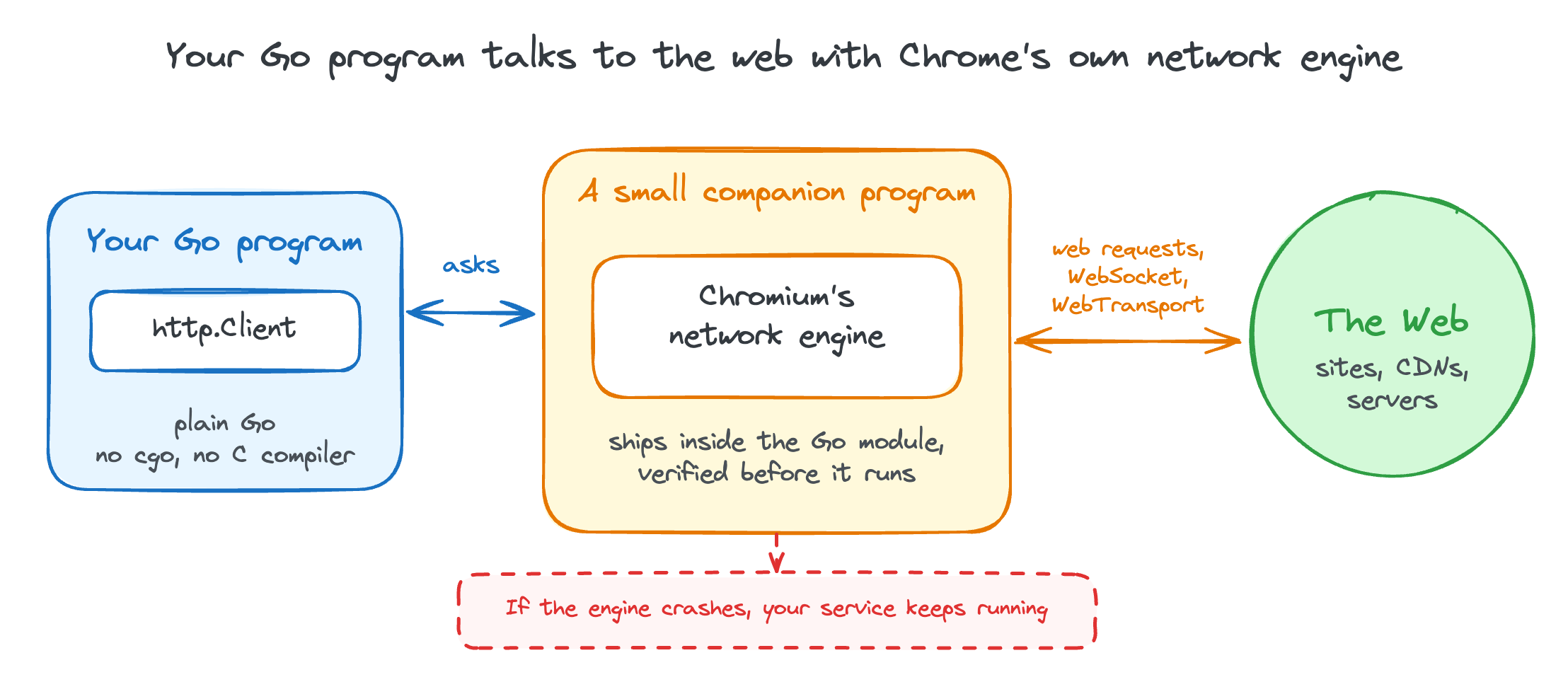
Your Go program stays plain Go while a small companion program carries traffic through Chromium's network engine.
There is nothing extra to install on your workstation or your servers, either. The engine binaries for Linux, macOS, and Windows, on both Intel/AMD and ARM, ship right inside the Go module and are verified before they run.
Shipping binaries inside a module understandably raises a question for anyone who cares about trust, and we wanted a straightforward answer. The binaries are built in a reproducible way from a specific Chromium release, currently Chromium 157, so anyone can rebuild them and get the exact same bytes, and each release is attested by GitHub. To keep up with the browser world without manual chores, a scheduled job follows Chromium's stable channel and updates the version automatically when a new Chrome ships.
What about uTLS?
If you have tried to make a Go client look like a browser before, you have probably met uTLS. It is a lovely piece of work: a Go library that lets you dress up the very first message of a secure connection so it resembles Chrome, Firefox, or whatever you like. It is small, it is pure Go, and nothing extra runs beside your program.
The catch is how far the costume goes. uTLS covers the handshake, which is the first few words of the conversation. Everything after that is still yours to build: the HTTP/2 layer has to be wired up and tuned by hand, HTTP/3 is a separate adventure, and WebSocket or WebTransport mean even more glue. The Chrome presets are also copies, so someone has to keep them current every time Chrome changes its habits. It is a bit like matching a person's accent while the rest of their body language still gives you away.
chromenet takes the opposite route. It does not imitate Chrome, it asks Chrome's own engine to do the talking, so the handshake, the way connections are reused, the protocol upgrades and the transports all come from one place and move together when Chromium moves.
The trade is honest. uTLS is lighter and lets you craft any greeting you can imagine, while chromenet brings a 25 MB helper and gives you Chrome's behavior rather than a custom one. If you want a tiny dependency and full control of the handshake, uTLS is still a great pick.
Every design has trade-offs, and we want to be upfront about the limits here. Packing a real browser network engine is not tiny: each engine binary is about 25 MB. On macOS, the binaries are not notarized. And on Linux, your system needs glibc 2.31 or newer. If those boundaries work for your setup, you get real Chrome networking by swapping a single transport field.
The project lives at github.com/gosuda/chromenet. If you know its sibling projects in the gosuda open source family, gosuda.org/hqq and gosuda.org/sqlite3, the spirit will feel familiar: taking capable, heavy machinery from the wider software world and making it feel right at home in plain Go.
So, if you reach for uTLS because you need your Go program to sound like a browser, give chromenet a try. It can be a good alternative to uTLS, especially when you need more than HTTPS requests: HTTP/2, HTTP/3, WebSocket and WebTransport all travel through the same Chrome engine, with no glue code on your side.