 GoSuda
Running Docker-in-Docker Inside gVisor and Nested Sandboxes with gvx

Quick Solution: Securely Running docker:dind Inside an Unprivileged gVisor (runsc) Sandbox
Cloud AI agent compute environments (such as Google Agent Compute Engine sandboxes), Kubernetes agent-sandbox deployments (RuntimeClass: gvisor), and reinforcement learning evaluation harnesses isolate untrusted workloads inside gVisor (runsc) containers specifically to protect the host kernel. When a workload inside a default unprivileged runsc container tries to install docker.io or docker-ce via apt-get, start service docker start or dockerd, and run docker build, it fails even if it has root (UID 0) inside the container.
With gvx (rungv), you can securely run docker:dind, docker build, and docker compose directly inside an unprivileged gVisor (runsc) container (or nest gvx inside gvx) without weakening the outer RuntimeClass, exposing host sockets, or granting --privileged.
Low-Effort, Token-Efficient Solution for AI Agents: Inside a gVisor-backed cloud agent environment, attempting to install
docker.ioand manually work around/etc/init.d/dockerulimiterrors,iptables-nftfailures,iptables-legacyraw-socket denials,overlay2mount errors, anddocker buildrunc/pivot_rootcrashes typically burns 20+ tool-call turns and tens of thousands of tokens before failing completely.gvx(rungv) is a low-effort, token-efficient drop-in solution: the agent runs 3 commands in a single turn to start a working user-space Docker daemon and immediately executesdocker buildanddocker composewithout modifying project files.
Preserving and Strengthening Outer Sandbox Isolation: Running
rungvinsiderunscdoes not bypass a single restriction enforced by the outergVisorsandbox. Instead,gvxcreates a second, nested user-space gVisorSentrykernel with its ownhostlockdown(PR_SET_NO_NEW_PRIVS+seccomp), its own in-memorynetstack, and a single-fileext4litevolume. Innerdockerdandrunccontainers are double-sandboxed: their system calls, mounts, and raw packets never leave the innergvxuser-space kernel.
 1# Inside an existing gVisor (runsc) container or Kubernetes Pod:
 2# Install rungv from a SLSA-attested GitHub release archive or via go install:
 3CGO_ENABLED=0 go install z.gfire.dev/gvx/cmd/rungv@latest
 4
 5mkdir -p ~/.gvx
 6rungv run \
 7  -p unix:~/.gvx/docker.sock:2375 \
 8  -v gvx-docker:/var/lib/docker \
 9  -e DOCKER_TLS_CERTDIR= \
10  docker:dind --tls=false &
11
12# Run standard Docker builds and containers against the inner gvx socket
13export DOCKER_HOST="unix://$HOME/.gvx/docker.sock"
14until docker info >/dev/null 2>&1; do sleep 0.5; done
15docker info --format '{{.Driver}} {{.OperatingSystem}}'
16# Output: overlayfs Alpine Linux ... (containerized)
17
18docker build -t nested-app:test .
19docker run --rm nested-app:test
Five Reasons Why Direct Docker Installation Fails Inside gVisor (runsc)
When a user or AI coding agent runs apt-get install -y docker.io (or docker-ce) inside a standard runsc container and attempts to start dockerd, it hits five sequential technical barriers.
1. Init Script (systemctl / service docker start ulimit) and Kernel Module (modprobe 4.4.0) Failures
After running apt-get install -y docker.io (or docker-ce), attempting to start the daemon via systemctl start docker or service docker start fails immediately because PID 1 is not systemd and /etc/init.d/docker attempts to raise ulimit -n above the sandbox's hard RLIMIT_NOFILE ceiling. When dockerd is then invoked directly, initialization scripts call modprobe to load overlay, bridge, br_netfilter, ip_tables, and nf_nat against gVisor's virtual kernel version (4.4.0), which has no /lib/modules/4.4.0 directory:
1System has not been booted with systemd as init system (PID 1). Can't operate.
2Failed to connect to bus: Host is down
3/etc/init.d/docker: 62: ulimit: error setting limit (Operation not permitted)
4level=warning msg="Running modprobe bridge br_netfilter failed with message: modprobe: WARNING: Module bridge not found in directory /lib/modules/4.4.0\nmodprobe: WARNING: Module br_netfilter not found in directory /lib/modules/4.4.0\n, error: exit status 1"
5modprobe: FATAL: Module overlay not found in directory /lib/modules/4.4.0
6modprobe: FATAL: Module br_netfilter not found in directory /lib/modules/4.4.0
7modprobe: FATAL: Module ip_tables not found in directory /lib/modules/4.4.0
8modprobe: FATAL: Module nf_nat not found in directory /lib/modules/4.4.0
2. iptables-nft (nf_tables Netlink), iptables-legacy Raw Socket Denials, and docker0 Bridge Failures
On Ubuntu 22.04, Ubuntu 24.04, and Debian 11/12, apt-get install docker.io selects iptables-nft (backed by the nf_tables netlink subsystem) as the default /usr/sbin/iptables alternative. Furthermore, even if the user or agent switches to iptables-legacy (update-alternatives --set iptables /usr/sbin/iptables-legacy), default unprivileged gVisor sandboxes (--net-raw=false) reject AF_INET, SOCK_RAW sockets with EPERM, causing iptables-legacy to fail with Permission denied (you must be root) even when running as UID 0:
1failed to start daemon: Error initializing network controller: error obtaining controller instance: failed to register "bridge" driver: failed to create NAT chain DOCKER: iptables failed: iptables --wait -t nat -N DOCKER: iptables v1.8.10 (nf_tables): Could not fetch rule set generation id: Invalid argument
2iptables v1.8.10 (legacy): can't initialize iptables table `nat': Permission denied (you must be root)
3Perhaps iptables or your kernel needs to be upgraded.
4iptables v1.8.10 (legacy): can't initialize iptables table 'nat': Table does not exist (do you need to insmod?)
5iptables: No chain/target/match by that name.
6Unable to enable SKIP DNAT rule: (iptables failed: iptables --wait -t nat -I DOCKER -i docker0 -j RETURN: iptables: No chain/target/match by that name.)
7Error initializing network controller: error obtaining controller instance: failed to create bridge "docker0": operation not permitted
3. overlay2 Failure on gofer / 9p Rootfs and vfs Disk Exhaustion
Unless the outer runsc administrator explicitly pre-configured a dedicated tmpfs or filestore mount at /var/lib/docker, the container rootfs is backed by gVisor's gofer (9p/lisafs) or a nested overlay mount. Mounting overlay2 on top of /var/lib/docker fails:
1level=error msg="[graphdriver] prior storage driver overlay2 failed: driver not supported"
2failed to mount overlay: invalid argument
3Error starting daemon: error initializing graphdriver: driver not supported: overlay2
When users or agents attempt to bypass this error by starting dockerd --storage-driver=vfs, Docker disables Copy-on-Write layer sharing completely. Every RUN instruction in a Dockerfile performs a full recursive copy (dirCopy) of the entire root filesystem, multiplying a 500 MB image across 10 build steps into 5 GB of writes and terminating the sandbox with no space left on device or an I/O timeout.
4. docker build (BuildKit) and Nested runc Failures (pivot_root, /proc, Cgroups, and DNS)
Even if dockerd is forced to start with dockerd --iptables=false --ip6tables=false --bridge=none --storage-driver=vfs, attempting to run docker build -t app . or docker run fails immediately when BuildKit or runc spawns the build container:
 1ERROR: failed to solve: process "/bin/sh -c ..." did not complete successfully:
 2docker: Error response from daemon: failed to create task for container: failed to create shim task: OCI runtime create failed: runc create failed: unable to start container process:
 3error during container init: error jailing process inside rootfs: pivot_root .: invalid argument
 4error during container init: error mounting "cgroup" to rootfs at "/sys/fs/cgroup": mount cgroup:/sys/fs/cgroup/cpuset (via /proc/self/fd/6), flags: 0xf, data: cpuset: operation not permitted
 5cgroups: cgroup mountpoint does not exist: unknown
 6runc create failed: systemd not running on this host: cannot use systemd cgroup manager
 7error during container init: error mounting "proc" to rootfs at "/proc": mount proc:/proc (via /proc/self/fd/6), flags: 0xe: operation not permitted
 8error during container init: error loading seccomp filter into kernel: operation not permitted
 9Temporary failure resolving 'deb.debian.org'
10Temporary failure resolving 'archive.ubuntu.com'
5. Nested runsc Fails with SECCOMP_FILTER_FLAG_NEW_LISTENER (EBUSY)
If a user tries to run another runsc instance inside runsc using the systrap platform, initialization aborts immediately:
1creating subprocess: sysmsg: failed to initialize thread: failed to install seccomp notify rules: device or resource busy
Both the Linux kernel and the gVisor Sentry allow at most one SECCOMP_FILTER_FLAG_NEW_LISTENER (SECCOMP_RET_USER_NOTIF) listener per task hierarchy. Because the outer sandbox already holds that listener slot, the inner seccomp(2) call returns EBUSY (device or resource busy).
How gvx Solves Nested Execution Inside gVisor
gvx addresses all five barriers inside its own user-space kernel and platform layer, enabling rungv to run inside an outer gVisor (runsc) container or even recursively inside another gvx container (gvx in gvx).
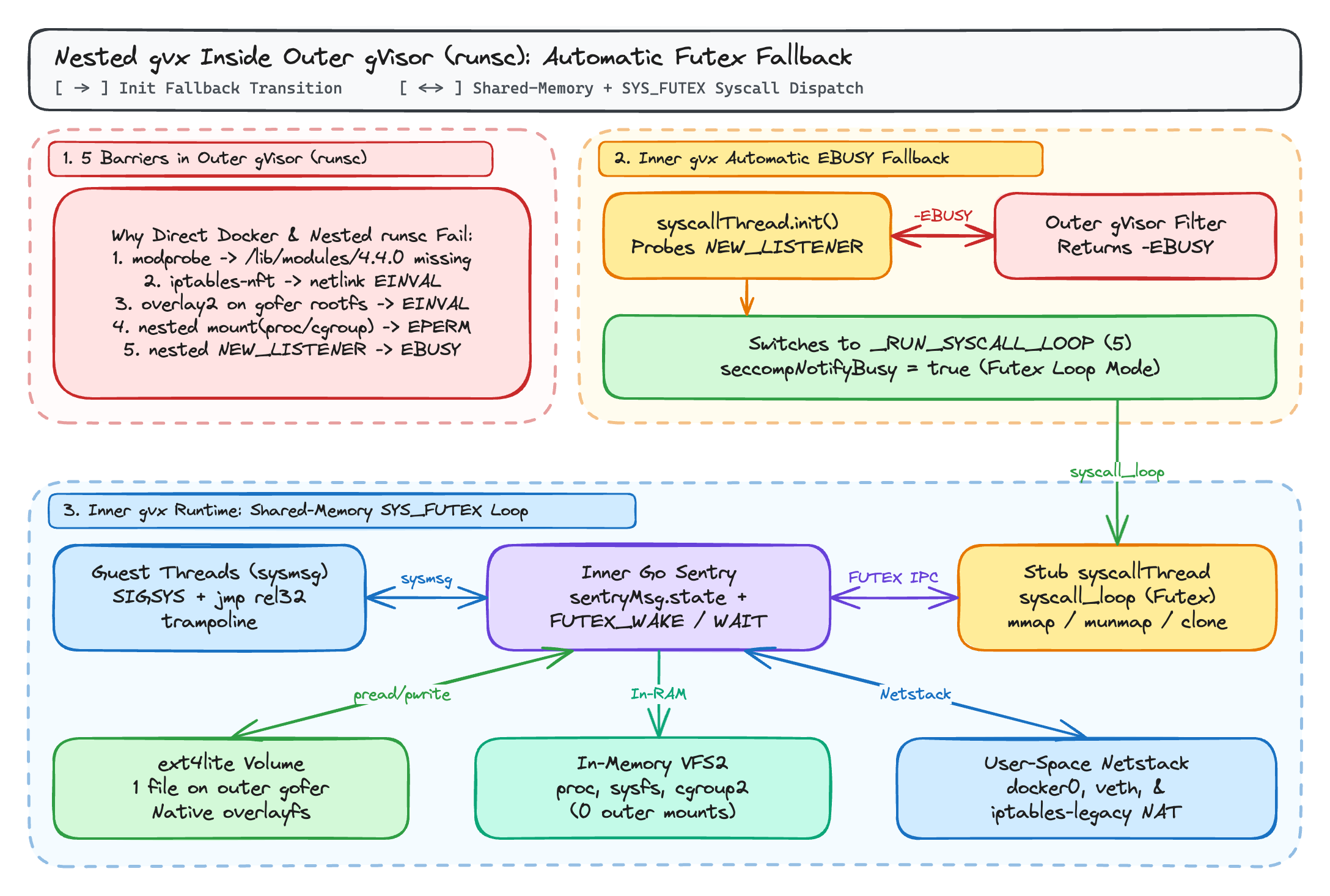
1. Automatic systrap Fallback from EBUSY to the _RUN_SYSCALL_LOOP Futex Loop
In Linux systrap, each stub subprocess runs two kinds of threads:
- Guest execution threads (
sysmsg): Trap guest system calls viaSECCOMP_RET_TRAP(SIGSYS) and binary-patchedjmp rel32trampolines (syshandler), exchanging register state with the Sentry over shared memory andSYS_FUTEX. - A stub
syscallThread(syscall_thread.go): Executes address-space system calls (mmap,munmap,clone) inside the stub subprocess on behalf of the Sentry.
In upstream gVisor, syscallThread supports two wake-up modes in stub_amd64.s and stub_arm64.s:
- Seccomp User-Notify Loop (
_RUN_SECCOMP_LOOP = 6, whent.seccompNotify != nil): DuringsyscallThread.init(),t.installSeccompNotify()installs aSECCOMP_RET_USER_NOTIFlistener (seccomp(SECCOMP_SET_MODE_FILTER, SECCOMP_FILTER_FLAG_NEW_LISTENER, stubSyscallRules)) so the Sentry can dispatch requests viaioctl(SECCOMP_IOCTL_NOTIF_SEND)andioctl(SECCOMP_IOCTL_NOTIF_RECV). - Futex Syscall Loop (
_RUN_SYSCALL_LOOP = 5, whent.seccompNotify == nil): ThesyscallThreadrunssyscall_loop(stub_amd64.s/stub_arm64.s), sleeping onSYS_FUTEX(FUTEX_WAIT) over the shared 2-pagesyscallSentryMessage(PROT_READin the stub) andsyscallStubMessage(PROT_READ | PROT_WRITEin the stub) region.
Upstream gVisor unconditionally calls t.installSeccompNotify() whenever seccompNotifyIsSupported is true, and aborts stub creation if seccomp(SECCOMP_SET_MODE_FILTER, SECCOMP_FILTER_FLAG_NEW_LISTENER, ...) returns EBUSY.
In gvx (pkg/sentry/platform/systrap/seccomp_notify_xplat.go and syscall_thread.go), syscallThread.init() calls t.installSeccompNotifyIfFree():
 1// pkg/sentry/platform/systrap/seccomp_notify_xplat.go
 2var seccompNotifyBusy atomic.Bool
 3
 4func (t *syscallThread) installSeccompNotifyIfFree() (*os.File, error) {
 5	if seccompNotifyBusy.Load() {
 6		return nil, nil
 7	}
 8	f, err := t.installSeccompNotify()
 9	if errors.Is(err, unix.EBUSY) {
10		if seccompNotifyBusy.CompareAndSwap(false, true) {
11			log.Warningf("Another seccomp listener exists in the filter chain of the host process. " +
12				"The stub threads use the slower futex loop instead of seccomp-unotify.")
13		}
14		return nil, nil
15	}
16	return f, err
17}
When installSeccompNotify() returns unix.EBUSY because an outer gVisor (runsc) or outer gvx sandbox already holds the process filter chain's single listener slot:
installSeccompNotifyIfFree()setsseccompNotifyBusy(atomic.Bool), logs one warning for the process, and leavest.seccompNotify == nilfor that stub and all subsequent stubs.- In
syscallThread.detach()(syscall_thread_amd64.goandsyscall_thread_arm64.go),t.seccompNotify == nilsetsregs.Rbx = _RUN_SYSCALL_LOOP(5) onamd64(orregs.Regs[9] = _RUN_SYSCALL_LOOPonarm64) instead of_RUN_SECCOMP_LOOP(6). - In
syscallThread.syscall()(syscall_thread.go), the inner Sentry dispatches stub syscalls purely through shared memory andSYS_FUTEX:
1// pkg/sentry/platform/systrap/syscall_thread.go
2// Notify the syscall thread about a new syscall request.
3atomic.AddUint32(&sentryMsg.state, 1)
4futexWakeUint32(&sentryMsg.state)
5
6// Wait for reply.
7futexWaitWake(&sentryMsg.state, atomic.LoadUint32(&sentryMsg.state))
Because SECCOMP_RET_TRAP filters on guest threads stack arbitrarily deep and syscallThread falls back to _RUN_SYSCALL_LOOP without requesting a second user-notification listener, gvx runs cleanly inside runsc and supports recursive nesting (gvx inside gvx).
2. Native overlayfs on Single-File ext4lite Volumes
To avoid mounting overlayfs on top of the outer gVisor container's gofer (9p/lisafs) root filesystem, -v gvx-docker:/var/lib/docker backs /var/lib/docker with gvx's internal ext4lite filesystem stored in a single regular file (gvx-docker.ext4).
To outer runsc, gvx-docker.ext4 is just one regular file accessed via pread64(2) and pwrite64(2). Inside gvx, ext4lite provides a JBD2-journaled ext4 filesystem with trusted.overlay.* and security.capability extended attributes, character device whiteout nodes (0:0), d_type directory entries, and RENAME_EXCHANGE, allowing the inner dockerd to use its native overlayfs storage driver.
3. Self-Contained netstack with docker0 and iptables-legacy
Inside gvx, dockerd does not interact with the outer runsc container's network interfaces or netfilter tables. Instead:
dockerdcreates itsdocker0bridge andvethpairs insidegvx's own user-spacenetstack.- All
iptables-legacyrules (-t nat -N DOCKER,MASQUERADE,conntrack,addrtype) execute againstgvx's internal netfilter implementation. - Nested
runccontainers mount their/proc,/sys, and/sys/fs/cgrouphierarchies insidegvx's in-memoryVFS2mount table, never calling the outerrunscmount(2)syscall.
Verifying Nested docker:dind Inside gVisor (or gvx in gvx)
You can verify both scenarios (rungv inside runsc, or rungv inside rungv) with the following commands:
 1# Inside an outer gVisor (runsc) container or an outer rungv container:
 2mkdir -p ~/.gvx
 3rungv run \
 4  -p unix:~/.gvx/docker.sock:2375 \
 5  -v gvx-docker:/var/lib/docker \
 6  -e DOCKER_TLS_CERTDIR= \
 7  docker:dind --tls=false &
 8DIND_PID=$!
 9
10export DOCKER_HOST="unix://$HOME/.gvx/docker.sock"
11until docker info >/dev/null 2>&1; do sleep 0.5; done
12
13# Verify that the inner Docker daemon is using native overlayfs (not vfs)
14docker info --format 'Storage Driver: {{.Driver}}'
15# Output: Storage Driver: overlayfs
16
17# Run a multi-layer build and execute a nested container
18mkdir -p /tmp/nested-test && cd /tmp/nested-test
19cat <<'EOF' > Dockerfile
20FROM alpine:3.20
21RUN adduser -D -u 1001 appuser && mkdir -p /app && chown appuser:appuser /app
22USER appuser
23WORKDIR /app
24RUN echo "nested-build-ok" > status.txt
25CMD ["cat", "/app/status.txt"]
26EOF
27
28docker build -t nested-test:latest .
29docker run --rm nested-test:latest
30# Output: nested-build-ok
31
32kill -INT $DIND_PID
Further Reading in This Series
- gvx: Running Linux Containers, Docker, and Kubernetes in One Unprivileged Process: Overview of
gvxacross Windows (whpx,systrap), macOS (hvf), and Linux (systrap). - Running Docker, docker build, and docker compose Without Root or User Namespaces: How
gvxrunsdocker:dindwhenroot,sudo,unshare(CLONE_NEWUSER),mount(2), and/dev/fuseare blocked. - Running Docker-in-Docker Inside gVisor and Nested Sandboxes with gvx (this post)
- Fast Isolated Docker Environments for AI Agent RL Rollouts with gvx: How to use
gvxand single-fileext4litecopy-on-write snapshots to run hundreds of parallelSWE-benchand RL rollout environments with 100-millisecond resets.